
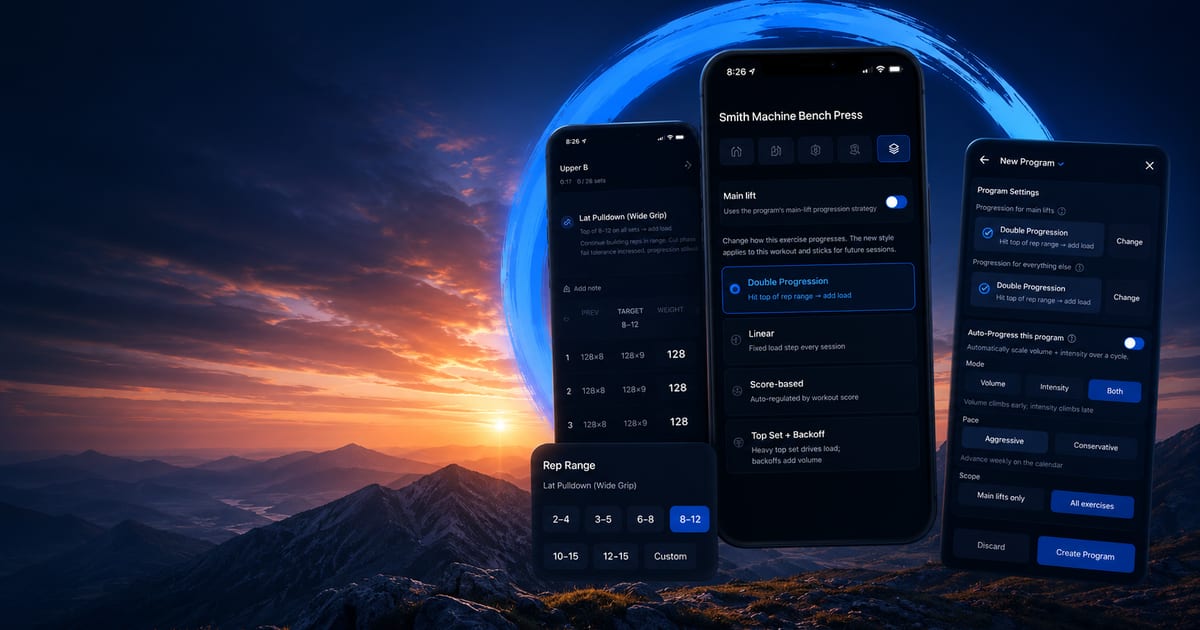
Kenso now lets you choose from twelve progression strategies per exercise.
Every lift in your program can now follow its own progression rule. Bench press can run Top Set + Backoff while bicep curls follow RPE Target and leg press cycles through volume waves. No more forcing every exercise through the same double-progression template.
What shipped
Twelve progression strategies are now selectable per exercise: Double Progression, Linear, Score-based, Top Set + Backoff, RPE Target, Pyramid, Reverse Pyramid, Wave Loading, Undulating (DUP), Volume Progression, Manual, and 5/3/1. Each exercise can run independently — bench can follow 5/3/1 while curls stick to RPE targets.
Auto-Progress macrocycles scale volume or intensity over 4, 6, or 8 weeks. Pick a mode (Volume, Intensity, or Both), a pace (Aggressive for calendar-driven progression or Conservative to advance only when targets are hit), a scope (main lifts only or all exercises), and whether to auto-deload the final week.
Every exercise row in the workout logger now shows a one-line execution cue under the name. 'RPE 8 · 3×8' for RPE Target. 'Top set RPE 8 · 3 backoffs @ 80%' for Top Set + Backoff. 'Heaviest first · 6/8/12 reps' for Reverse Pyramid. No more remembering what each strategy means.
RPE-driven strategies pre-fill the RPE column. Pyramid and Reverse Pyramid render the per-set rep wave automatically. Swap strategies mid-workout and your set rows reshape immediately — change to RPE Target and your rows become 3×8 with RPE 8 prefilled.
Mid-workout, tap any exercise → Strategy tab → 'Main lift' toggle to mark that exercise as the day's main lift and apply your program's main-lift progression strategy without leaving the workout.
How to use it
Open any program and tap an exercise. The Strategy tab now shows all twelve progression options. Pick the one that matches how you want that lift to progress.
For RPE-based strategies, the workout logger will pre-fill RPE values and show execution cues. For pyramid schemes, it renders the rep wave automatically. For top-set-plus-backoff, it shows your top set target and backoff percentages.
To set up Auto-Progress, go to your program settings and enable macrocycle progression. Choose your timeline (4, 6, or 8 weeks), mode (volume, intensity, or both), and pace (aggressive or conservative). The system will scale your training variables automatically over the cycle.
If you want to change a lift's strategy mid-workout, tap the exercise and switch in the Strategy tab. The set rows will reshape immediately to match the new progression style.
Why we built it
Three real pain points pushed us to ship this.
First — one-size-fits-all progression. Every exercise in Kenso ran double progression by default. That's fine for beginners on hypertrophy lifts. It's the wrong rule for heavy compounds (which usually want top-set-plus-backoff or 5/3/1) and the wrong rule for high-volume isolation (which wants volume cycles). Users who knew their training had to either fight the engine or plan progression somewhere else.
Second — no way to follow a real program. When a coach prescribes '3×8 @ RPE 8' or 'top set RPE 8, then 3×5 @ 75%', Kenso couldn't represent it natively. Users had to mentally translate the prescription into individual weights and hope the engine's auto-regulation didn't fight them.
Third — stalls had no escape route. When a lift plateaus on double progression, the correct response is usually to switch progression style, not grind the same scheme harder. There was no way to do that without rebuilding the whole program.
The fix isn't more rep-range presets or smarter autoregulation. It's letting the user say what each lift should do, then matching the engine to that choice. That's what shipped today.
Additional fixes
Adherence math now works correctly. A 4-day/week program with 4 sessions in week 1 reads 4 of 4, not 4 of 3. The denominator is always week number × days per week — your mental model, not a fractional pro-rate.
The Health & Recovery back button returns to wherever you came from. The 'last trained' chip on workout previews no longer leaks dates across programs. Active programs hide the Edit Program option in favor of Duplicate-to-Edit so mid-program changes can't break your existing variants.
Progression strategies and Auto-Progress are Pro features. Free users default to Manual progression with upgrade prompts on strategy choosers. Existing 5/3/1 programs keep working even if users drop off Pro.
Now your program can match how each lift actually trains best.