
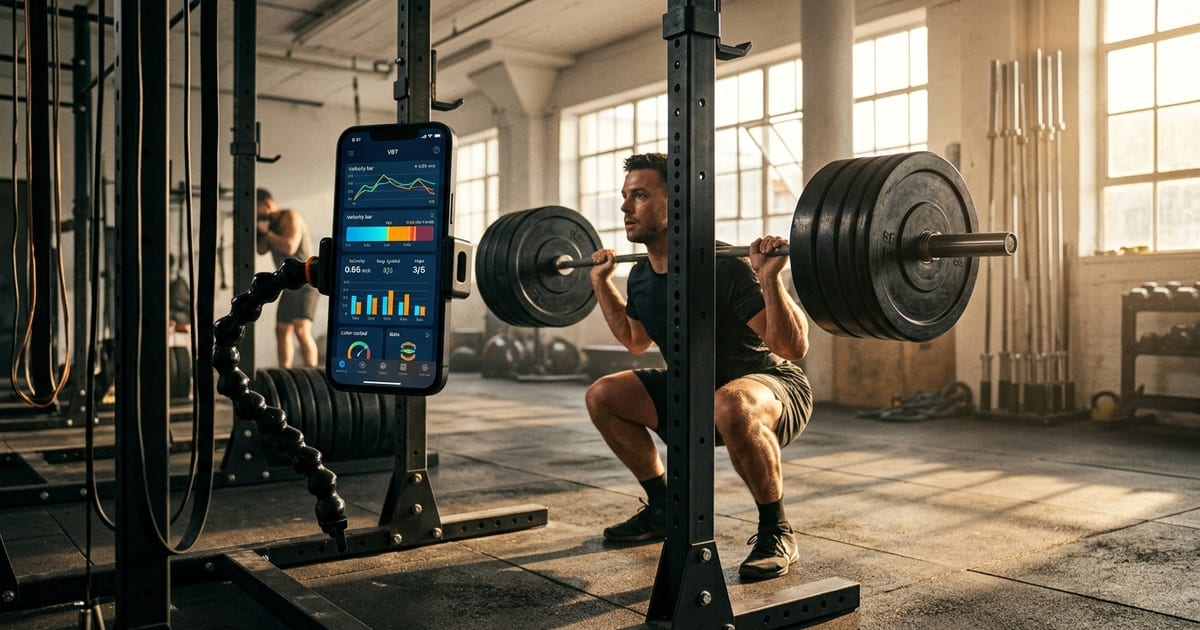
Best VBT Apps and Phone-Camera Bar Speed Trackers for iPhone (2026)
The Short Answer
The best VBT apps for iPhone in 2026 are My Jump Lab (most validated, broadest testing battery), Metric (best for lifters who want VBT integrated with full workout logging), and EliteForm Lift Tracker (best for powerlifting-specific velocity work, per the developer's description). Camera-based tracking has matured: modern phone-camera apps can approximate mean concentric velocity under controlled conditions, and the validation work on Dr. Carlos Balsalobre-Fernández's smartphone apps (see below) suggests this can be close enough for many lifters to make autoregulation decisions without spending $500–$1,500 on dedicated hardware. Accuracy still depends heavily on consistent camera setup, and for the highest-stakes decisions a tethered device remains the gold standard.
How Phone-Camera VBT Works
Velocity-based training rests on the relationship between barbell velocity and relative load. Each lifter has a relatively stable load-velocity profile: a given percentage of 1RM corresponds to a fairly predictable mean concentric velocity (MCV). When MCV drops below an individual threshold — a velocity loss relative to the first rep of a set — accumulated fatigue may be sufficient to justify ending the set or reducing load.
Phone-camera apps exploit this relationship by using computer vision to track a high-contrast reference point on the barbell (usually a piece of tape or the collar) frame by frame. Older apps relied on 30fps capture, which limited resolution at high velocities. Modern apps use the iPhone's 60fps or 120fps slow-motion modes to reduce temporal error, which matters most for the 0.2–0.8 m/s range where most strength work occurs.
The primary limitation remains camera positioning. Unlike a tethered linear position transducer (LPT) mounted directly to the bar, a phone on a tripod captures a 2D projection of 3D movement. Any bar drift toward or away from the camera introduces cosine error — a systematic underestimate of true velocity. This error is more manageable when the camera is placed perpendicular to the bar path and at mid-lift height, but it compounds quickly if setup is inconsistent between sessions.
The Research on Camera-Based VBT Accuracy
Validation Against LPT Devices
The most frequently cited validation work for smartphone velocity tracking comes from Dr. Carlos Balsalobre-Fernández and colleagues, whose studies on smartphone-based measurement of movement velocity have been published in peer-reviewed sports science journals (e.g., Balsalobre-Fernández et al., validation work on smartphone apps in the Journal of Sports Sciences). This body of work reports strong agreement between smartphone video analysis and reference devices for selected barbell movements when camera placement protocols are followed. Rather than quote a specific agreement figure here, readers should consult the original studies for the exact reported limits of agreement and validity coefficients, which vary by exercise and protocol.
The caveat is exercise selection. Unilateral movements, Olympic lifts with significant horizontal bar displacement, and exercises where the bar path varies substantially between reps show wider agreement limits. If your primary use case is tracking squat or bench velocity for autoregulation, camera apps are generally more reliable. If you're tracking bar path during the snatch, the margin of error widens.
Load-Velocity Profiles and Individual Variation
Load-velocity profiles tend to be more stable within individuals than between them. A 0.50 m/s mean concentric velocity on the squat might correspond to 75% 1RM for one lifter and 70% for another. This is why apps that let you build your own load-velocity profile — rather than relying on population averages — produce more actionable autoregulation data. My Jump Lab and Metric both support individualized profiling; EliteForm Lift Tracker uses reference norms by default, per the developer's description.
Velocity Loss Thresholds and Fatigue
A ~20% velocity loss is a commonly used practitioner stopping criterion in VBT. Research on velocity loss as a training variable — for example, Pareja-Blanco et al. (2017), Scandinavian Journal of Medicine & Science in Sports — has examined how different velocity-loss magnitudes affect strength and hypertrophy adaptations. In practice, lower thresholds (often cited as 10–15%) are used for power-dominant blocks, while higher thresholds (around 25–30%) are sometimes used during hypertrophy phases targeting more total volume. These are best treated as practitioner guidelines rather than firm consensus values. The key point for app selection: your chosen app should let you set a custom velocity loss threshold, not just a fixed one.
What to Look for Before Picking a VBT App
Before reviewing individual products, here are the specifications that actually matter:
- Frame rate support: 60fps minimum; 120fps slow-motion is meaningfully better for high-velocity movements (> 0.8 m/s)
- Tracking method: AI/ML-based end-of-bar tracking tends to be more consistent than manual region-of-interest selection
- Profile customization: Can you input your own load-velocity data points, or does the app use fixed population averages?
- Velocity loss alerts: Real-time audio or visual feedback during the set, not just post-set analysis
- Data export: CSV or integration with a logging platform so velocity data doesn't live in a silo
- Exercise library: Does it cover your primary lifts? Olympic lifting apps differ substantially from powerlifting-focused ones
- Price model: One-time purchase vs. subscription — both exist in this category
For a broader look at how camera apps compare to dedicated hardware like GymAware, Push Band, and MyLift, see our full VBT device comparison covering tethered and sensor-based options.
Product Picks
My Jump Lab
Verdict: The most scientifically validated camera-based performance testing app available, developed by Dr. Carlos Balsalobre-Fernández — a researcher whose work on smartphone-based performance testing has been published in peer-reviewed journals. Best for coaches and athletes who want a comprehensive testing battery beyond just bar velocity.
- Measures jump height, barbell velocity, range of motion, and additional physical performance metrics
- Uses smartphone camera with validated computer vision tracking
- Developed by an active sports science researcher with a publication record in this specific area
- Pricing: check the App Store for current subscription options
Best for: Strength and conditioning coaches, athletes in sports requiring jump and velocity testing, researchers
Metric
Verdict: A strong option for lifters who want VBT integrated directly into their workout log. Per the developer's description, it tracks bar speed and related metrics without external hardware, alongside a training planner.
- AI-based bar tracking with no additional hardware required
- Per the developer's description, tracks bar speed, power, estimated 1RM, and bar path within a single app (feature details may change; verify in the App Store)
- Per the developer's description, includes a workout planner, video storage, and analytics dashboard
- Supports both powerlifting and general strength training movements
Best for: Intermediate to advanced lifters who want velocity data and traditional logging in one place, without managing two separate apps
EliteForm Lift Tracker
Verdict: Built by the team behind the Eliteform Powertracker rack-mounted system, this app brings hardware VBT experience to a phone-camera format. A reasonable pick for powerlifters focused on the competition movements.
- Per the developer's description, records velocity on common barbell lifts using the front-facing camera (exact lift count, frame rate, and metrics should be confirmed in the App Store listing)
- Surfaces per-set training metrics
- Full training history unlocked within the app
- Developed by a team with hardware VBT experience
Best for: Powerlifters who want a purpose-built tool from a team with a hardware VBT background
WL Analysis
Verdict: A specialized tool for Olympic weightlifting, focused on bar velocity and bar path during the snatch and clean and jerk, per the developer's description. Not a general-purpose VBT app — but a focused option for weightlifters.
- Per the developer's description, bar velocity measurement specific to Olympic weightlifting movements
- Designed around snatch and clean and jerk bar path analysis
- Niche use case — not suitable as a primary tool for powerlifters or general strength athletes
Best for: Olympic weightlifters who want movement-specific velocity and bar path data
Comparison Table
| App | Primary Use Case | Tracking Method | Hardware Required | Exercise Coverage | Logging Integration |
|---|---|---|---|---|---|
| My Jump Lab | Testing battery + bar velocity | Camera (CV, validated) | None | Jumps, bar lifts, ROM | Limited |
| Metric | VBT + full workout logging | AI bar tracking | None | General strength | Yes (built-in) |
| EliteForm Lift Tracker | Powerlifting velocity | Camera | None | Barbell lifts | Training history |
| WL Analysis | Olympic weightlifting | Camera | None | Snatch, C&J | Limited |
Feature details per each developer's description; verify current specifications in the App Store.
How to Choose the Right App for Your Training
You're a powerlifter focused on squat, bench, and deadlift autoregulation: EliteForm Lift Tracker or Metric. Both are built around bilateral barbell movements and give you velocity feedback without requiring external hardware.
You want VBT and your training log in one place: Metric is the clearest option here. Managing velocity data in one app and session logs in another creates friction that most lifters won't sustain over a full training cycle.
You're a coach running group testing: My Jump Lab is the most validated option and covers the broadest performance testing battery — useful if you're assessing athletes across multiple physical qualities, not just bar velocity.
You're an Olympic weightlifter: WL Analysis is the only app in this list designed specifically around the snatch and clean and jerk. General VBT apps handle these movements less reliably due to significant horizontal bar displacement.
Accuracy is non-negotiable and budget allows: Consider pairing a camera app with a tethered device for cross-validation during your first training block. Once you trust your camera setup, the tethered device becomes optional for most training contexts.
How This Fits Into Your Training Log
Kenso is an iOS training logger: you record sets, reps, weight, and RPE, and its rule-based double-progression engine suggests your next session's weight/rep targets and flags deloads. Kenso does not measure or ingest velocity data. If you use a VBT app separately, you can note a velocity observation as free text alongside a set, but the Kenso AI Coach (Kenso Pro) interprets your logged training history — not velocity numbers — when helping you adjust programs.
Common Concerns About Camera-Based VBT
"Is phone-camera tracking accurate enough to actually use for autoregulation?"
For many intermediate and advanced lifters training bilateral barbell movements, it can be — but the biggest source of error is inconsistent camera placement between sessions, which careful setup protocols can largely eliminate. If you're a competitive powerlifter peaking for a meet, a tethered LPT removes the positioning variable entirely. For general training, a well-set-up camera app is often sufficient.
"Won't the accuracy drop on Olympic lifts?"
Yes, and this is worth taking seriously. The snatch and clean and jerk involve significant horizontal bar displacement and rapid direction changes that introduce cosine error and tracking challenges for 2D camera systems. WL Analysis is built specifically for this context, but even then, Olympic lifting VBT data should be interpreted with wider error margins than squat or bench data.
"Do I need a tripod, or can I prop my phone against something?"
A proper tripod is not optional if you want consistent data. Camera angle drift of even 5–10 degrees between sessions introduces systematic error that compounds over time and makes session-to-session velocity comparisons unreliable. A basic adjustable tripod costs less than a single month of most VBT subscriptions and is the single most important accessory for camera-based tracking.
"These apps all look similar — is there a meaningful difference between them?"
Yes. The primary differentiators are: (1) whether the app supports individualized load-velocity profiling vs. population norms, (2) whether velocity feedback is real-time or post-set only, (3) how well the app integrates with your existing logging workflow, and (4) the quality of the underlying tracking algorithm. My Jump Lab has the strongest published validation record. Metric has the most complete logging integration, per the developer's description. EliteForm Lift Tracker has a powerlifting-specific pedigree via its hardware background.
Conclusion
Camera-based VBT has moved from a rough approximation to a genuinely usable training tool for many lifters, provided setup is consistent. The accuracy gap with tethered LPT devices has narrowed, but it has not disappeared — cosine error from imperfect camera placement is a real limitation, and for the highest-stakes, highest-precision decisions (such as competition peaking), tethered devices remain the more reliable choice.
The right app depends on what you're trying to solve. If you want the most validated testing battery, My Jump Lab is the clear choice. If you want VBT embedded in a complete logging workflow, Metric is the most integrated option. If you're a powerlifter who wants a purpose-built tool from a team with hardware VBT experience, EliteForm Lift Tracker is worth a close look.
What all of these tools share is the same underlying principle: velocity data is only useful if it informs the next decision. Logging a velocity number and doing nothing with it is no different from not measuring at all. The goal is a feedback loop — measure, interpret, adjust — and that loop requires your velocity data to connect to your training plan in a way you'll actually act on.
FAQ
What is the most accurate VBT app for iPhone in 2026?
My Jump Lab has the strongest independent validation record, developed by Dr. Carlos Balsalobre-Fernández, whose research on smartphone-based performance testing is published in peer-reviewed sports science literature. For general barbell tracking, Metric and EliteForm Lift Tracker are also well-regarded. Camera-based apps have narrowed the gap with high-end LPT devices under controlled conditions, though exact agreement varies by exercise and setup — consult the published validation studies for specific figures.
Do I need any hardware to use a bar speed tracker app?
No. Apps like My Jump Lab, Metric, and EliteForm Lift Tracker require only your iPhone and a stable camera mount. A tripod is strongly recommended for consistent positioning — inconsistent camera placement is the primary source of error in phone-camera VBT, not the app itself.
What frame rate does my iPhone need for VBT tracking?
60fps is the practical minimum for reliable velocity tracking in the 0.2–0.8 m/s range typical of strength training. Most modern iPhones support 120fps slow-motion, which improves resolution for higher-velocity movements (above 0.8 m/s) such as speed-strength work and Olympic lifting derivatives.
What velocity loss threshold should I use for strength training?
A ~20% velocity loss is a commonly used practitioner stopping criterion for strength-focused training. Lower thresholds (10–15%) are often used for power and speed-strength work; higher thresholds (25–30%) are sometimes used during volume-focused hypertrophy phases. For the underlying research on how velocity loss affects adaptation, see Pareja-Blanco et al. (2017), Scandinavian Journal of Medicine & Science in Sports. Your VBT app should allow you to set a custom threshold rather than applying a fixed default.
How does a VBT app compare to a dedicated device like GymAware or Push Band?
Dedicated tethered devices (LPTs) remain the gold standard for accuracy and eliminate cosine error from camera positioning. Camera apps have closed much of the gap for bilateral barbell movements under consistent conditions. Tethered devices cost $500–$1,500+; camera apps are a fraction of that. For most training contexts, a well-set-up camera app is sufficient; for competitive athletes in peak phases, a tethered device removes a variable. See our full hardware vs. camera VBT comparison for a detailed breakdown.
Can Kenso work alongside a VBT app?
Not through any data integration. Kenso is an iOS training logger with a rule-based double-progression engine and a Claude-powered AI Coach (Kenso Pro) that has access to your full training history. It cannot ingest velocity data in any structured way and does not connect to VBT apps or camera systems. You can manually note a velocity observation as free text in a set note, but the AI Coach interprets your logged training history (sets, reps, weight, RPE, and Apple Health data) — not velocity numbers per se — when helping you adjust progression.
Is camera-based VBT reliable enough for competitive powerlifters?
For general training and autoregulation, camera apps can be reliable enough — provided camera setup is consistent and the lifter is tracking bilateral movements. For competition peaking phases where precision matters most, many competitive lifters prefer a tethered LPT to eliminate positioning variability, since cosine error from camera placement is not fully removed by any phone-camera app. The honest answer is that camera apps suit the majority of everyday training decisions, while the highest-stakes decisions are better served by tethered hardware.